On-device audio transcription
Transcribes audio recordings on the Mac and retains word-level timing. Open an audio file or record through the app microphone; Apple on-device recognition is used until another speech model is downloaded. Transcription is English-only.
Speaker labeling and review
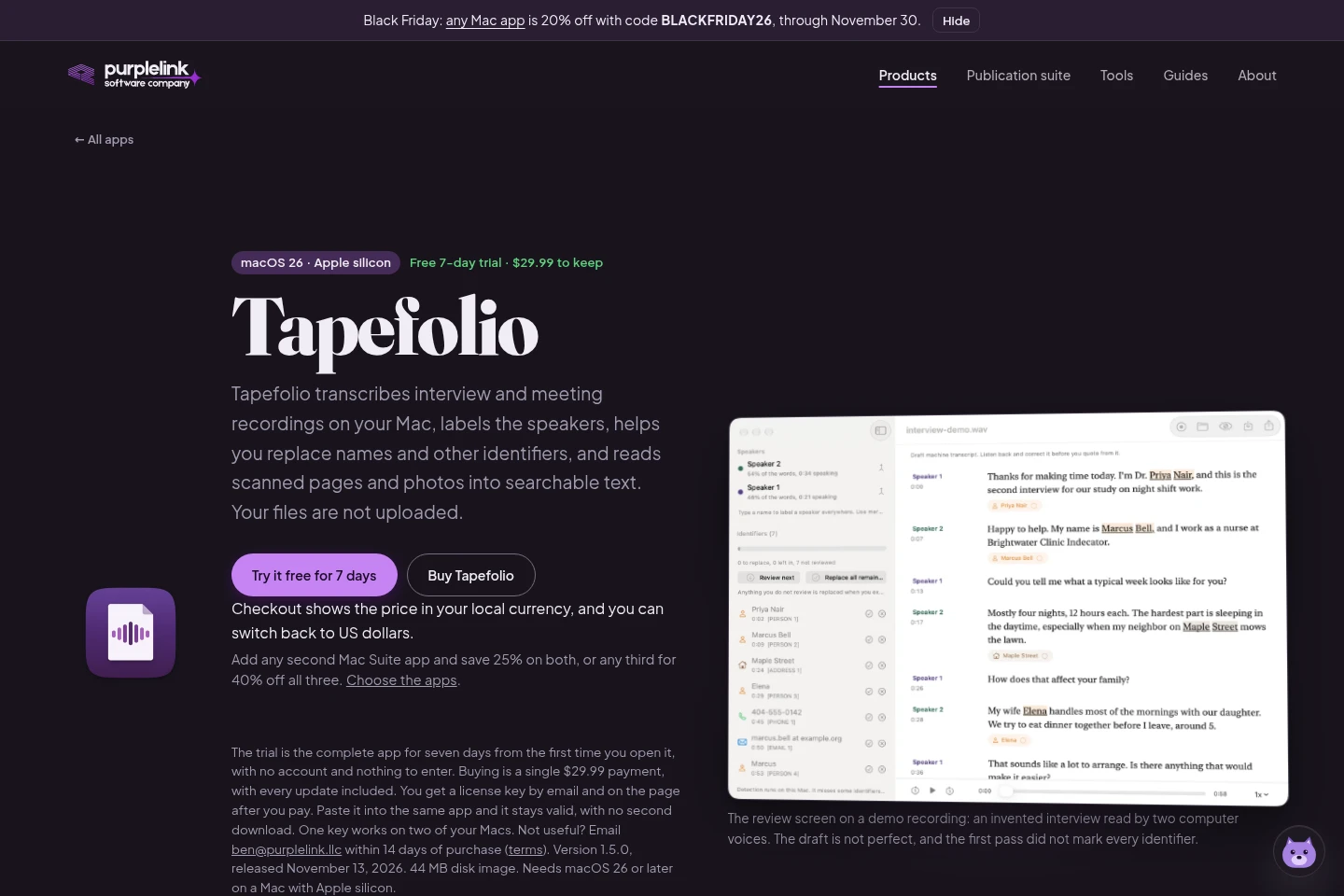
Displays a recording beside its transcript, highlights the spoken word, and lets you correct text, name speakers, and merge labels for the same person. Speaker-separation models are included, with other downloadable models available.
Case-by-case identifier replacement
Finds potential names, places, organizations, contact details, ID numbers, and birth dates, then replaces selected items with consistent codes. Review each item to replace or keep it; detection can miss identifiers, so inspect the result. The code-mapping key is stored separately.
Batch OCR for scanned pages
Reads scanned pages and photos into searchable text. Add image files for batch processing and review recognized lines and per-file confidence in the app.
Transcript and MAXQDA export
Exports transcripts in Word, HTML, Markdown, plain text, SRT, VTT, and JSON, including a timestamped Word format for MAXQDA. Choose export options such as timestamps and identifier replacement.
Call recording
Records supported Zoom, Microsoft Teams, Google Meet, and FaceTime calls with call audio on a separate track from the microphone. Start and stop recording yourself, and confirm before each call that everyone has agreed to be recorded.








Comments