
Pictostl - AI-powered JPG to STL converter for turning 2D images into 3D printable models directly in your browser
Launched on Sep 24, 2026Pictostl is an online AI tool that converts JPG, PNG, and WebP 2D images into STL and GLB 3D mesh files, designed for 3D printing projects. It supports multiple quality tiers, multi-angle image inputs, and interactive 3D previews, so users do not need to install complex 3D modeling software to generate usable 3D models from photos. This tool fits hobbyists, 3D printing creators, and designers who need to quickly turn 2D reference images into printable 3D assets.
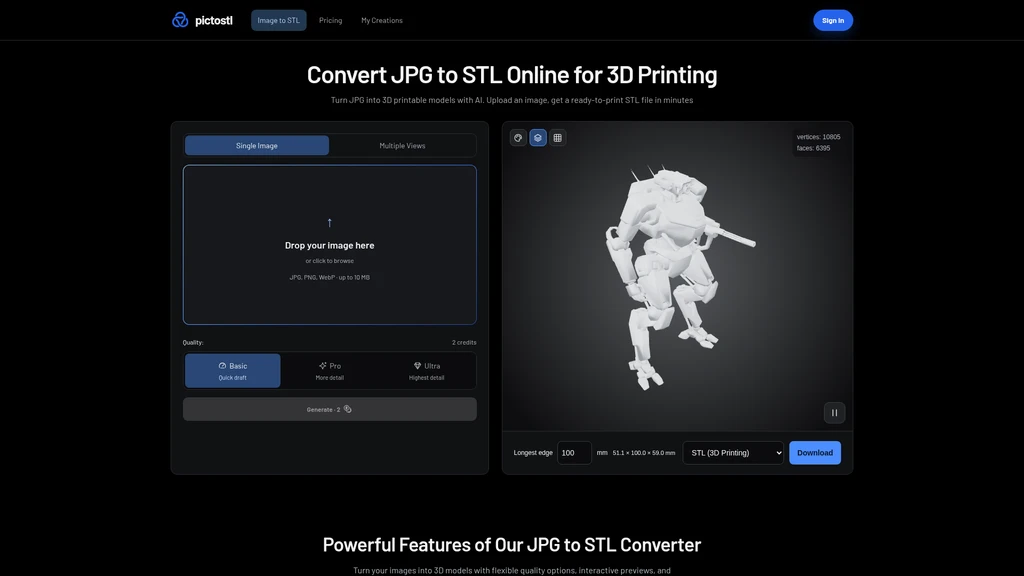
Core Features
Pictostl runs entirely in your web browser, no local 3D modeling software installation required. It supports input of JPG, PNG, and WebP image formats, and exports final 3D assets as either STL for 3D printing (geometry only) or GLB to retain full color textures. Users can upload multiple photos of the same object taken from different angles, which gives the AI more visual data to reduce guesswork for hidden surfaces and produce more detailed and accurate 3D meshes. Three distinct quality tiers are available for generation:
Basic: Lightweight output with 15,849 vertices, 18,690 faces, 1024 × 1024 color texture, 0.93 MB STL file size, intended for quick drafts and fast previews.
Pro: Mid-tier output with 783,028 vertices, 1,497,882 faces, 2048 × 2048 color, metallic/roughness and normal maps, 74.89 MB STL file size, for most standard 3D printing use cases that need rich detail.
Ultra: Highest detail output with 1,010,881 vertices, 1,933,489 faces, 4096 × 4096 color, metallic/roughness and normal maps, 96.67 MB STL file size, for projects that require maximum surface detail. All generated models can be inspected in the interactive 3D preview window, where users can rotate, zoom, and switch between Original (textured), Solid (untextured geometry), and Wireframe (mesh face edges) views to check shape quality before download. Users can also set the maximum edge length in millimeters to define the exact physical size of the exported STL file, which eliminates unit scaling issues common with raw STL files in 3D slicers.
Standard Workflow
The full conversion process takes 3 simple steps:
Upload your clear, well-lit 2D photo. For best results, upload multiple photos of the same object from front, back, left, and right angles with consistent lighting and background.
Select your desired quality tier between Basic, Pro, or Ultra, and confirm the required credit cost before generation starts.
Inspect the generated 3D model in the interactive preview, set your target physical size in millimeters, then download your STL or GLB file.
Pricing and Usage Rules
After account verification, every user gets 2 free credits, which is enough to run one full Basic quality generation and STL download. Additional generations require purchase of extra credits. The AI generates 3D shapes by interpreting light, shadow, and visual cues from input photos. It makes educated guesses for surfaces that are not visible in any uploaded image, so the output is not a dimensionally accurate 3D scan. You should always inspect the final geometry and confirm dimensions in your slicer before starting a 3D print. STL files do not store color or texture data, all texture and color information will only be retained in exported GLB files.
Related Content

Copy.ai Review 2026: AI Copywriting Made Easy
Our honest Copy.ai review for 2026. We test Content Agents, AI Workflows, pricing ($29-$249/mo), and compare it to Jasper and Writesonic. Find out if it's worth it for your marketing team.

Rytr Review 2026: Is This Budget AI Writer Worth It?
Our hands-on Rytr review for 2026. We test features, pricing, content quality, and compare it to Jasper & ChatGPT. Find out if Rytr is the best budget AI writing tool.
Word Changer - Free AI tool to rewrite and improve your writing instantly
Writing always using repetitive words or need to avoid plagiarism? Word Changer is a free AI writing assistant that instantly rewrites any text with richer vocabulary and appropriate tone. Get multiple versions with one click, adjust formality level, check readability - all for free!
Unite - AI-powered platform for romantic fantasies and dream couple moments
Explore romantic fantasies and create special moments for your dream couple. This AI-powered platform lets you generate personalized romantic content and experience exclusive AI-created romantic experiences.
Comments