Discover the effortless way to manage your notes with AI technology that learns from you. With FreeNote, next-level productivity is just a click away!
How It Works
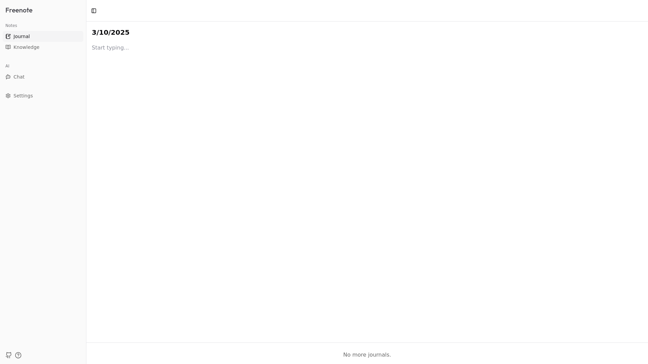
FreeNote operates by utilizing the latest artificial intelligence technology to create a seamless note-taking experience. It employs machine learning algorithms to understand your writing style and preferences, aiding in enhancing your productivity. Users can create detailed journals, organized knowledge bases, and access customizable settings that cater to their unique needs. This intelligent note assistant is designed to learn and adapt, ensuring that adding, retrieving, and organizing notes is effortless. Here’s how it works:
- AI Learning: The more you write, the better FreeNote understands your style.
- Organized Journals: Keep your thoughts and ideas neatly categorized.
- Knowledge Base: Store important information for easy access later.
- Customization: Adjust settings to match your preferences and workflow.
- User-Friendly Interface: Navigate easily with a clear and intuitive layout.
- Increased Productivity: Spend less time managing notes and more time on creativity.
Usage
Getting started with FreeNote is a straightforward process that will enhance your note-taking experience. Here’s how:
- Sign Up: Visit the FreeNote website and create a free account, or log in if you already have one.
- Explore the Interface: Familiarize yourself with the main dashboard, where you can access journals, knowledge bases, and settings.
- Create a Journal: Start a new journal by clicking on the ‘New Journal’ button. Name it and set the date.
- Type Your Thoughts: Begin typing your notes. FreeNote’s AI will learn from your entries as you go along.
- Organize Your Knowledge: Use the knowledge feature to sort important information by categories for easy retrieval.
- Adjust Settings: Personalize your experience through the settings section, allowing FreeNote to better cater to your writing habits.
- Save and Sync: Ensure your notes are saved and synced across devices automatically, so you never lose important information.
- Engage with the AI: Utilize AI suggestions while writing to enhance clarity and creativity.
- Review and Refine: Regularly check your journals and knowledge bases, adding new insights as they come to you.
- Share Your Notes: Consider sharing selected journals with others when collaboration is needed.
Personal Journaling
FreeNote allows users to easily document their personal thoughts and experiences, fully customizable to their own style.
Knowledge Management
Organize important information efficiently, making research and retrieval simple and intuitive.
Creative Writing
Capture inspiration on the go with dedicated journals to foster creativity and idea exploration.
Team Collaboration
Enable team members to share insights and knowledge, improving joint productivity and collaboration.
Goal Tracking
Utilize FreeNote to track personal or professional goals, making progress implementation easier.
Educational Use
Facilitate learning with organized notes that enhance retention and understanding of study material.
Features
- AI Learning: FreeNote adapts to your writing style over time, ensuring that your experience becomes increasingly personalized.
- Organized Journals: Create and manage multiple journals to keep your thoughts structured and easily accessible.
- Knowledge Management: Store and categorize important information, making it simple to find and reference later.
- Customizable Settings: Personalize your note-taking environment to suit your needs, maximizing comfort and efficiency.
- User-Friendly Interface: Navigate seamlessly with an intuitive layout that requires minimal effort to operate.
- Increased Productivity: Focus more on your thoughts and ideas while FreeNote handles the organization and retrieval.
FAQ
- What is FreeNote and how does it work?
FreeNote is an AI-powered note-taking application that helps streamline the management of your notes by learning your writing preferences, offering organized journaling and knowledge features.
- Can I use FreeNote for personal journaling?
Yes, FreeNote is perfect for personal journaling, allowing you to document your daily thoughts and experiences in a customizable format.
- How does the AI in FreeNote enhance my note-taking experience?
The AI in FreeNote learns from your writing style and behaviors, providing personalized suggestions and improvements as you take notes.
- Is FreeNote suitable for academic use?
Absolutely! FreeNote allows students and researchers to organize their notes and knowledge, making it an excellent tool for academic work.
- Do I need to pay to use FreeNote?
FreeNote offers a free plan which allows users to access most features without a subscription.
- What settings can I customize in FreeNote?
Users can customize various settings to suit their preferences, including layout options, notification settings, and more.
- Can I access my notes on multiple devices?
Yes, FreeNote automatically syncs across devices, ensuring you can access your notes wherever you are.
- Is there a limit to the number of journals I can create using FreeNote?
No, FreeNote allows users to create as many journals as needed, making it easy to categorize thoughts and ideas.




Comments